博文
把声子模式anime.ascii文件生成可以用VESTA打开的程序
|
(本文首发于个人知乎: 把声子模式anime.ascii文件生成可以用VESTA打开的程序 - 知乎)
anime.ascii文件为Phonopy软件计算声子谱时生成的振动模式文件,它可以被V_SIM软件(https://l_sim.gitlab.io/v_sim/)打开,但是V_SIM显示声子振动不是很美观,而且是一个动态图片,并不适合用于发表文章。下面,分享一个后处理程序,它可以把anime.ascii文件转换为可以用VESTA打开的*.vesta文件。
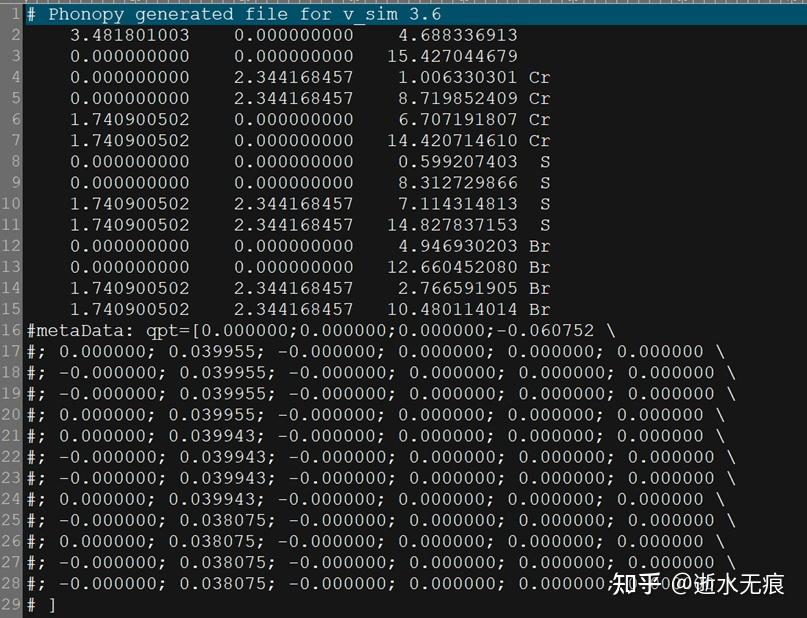
图 1 anime.ascii文件格式
原理:anime.ascii文件存储了原子的位置,波矢q、频率以及振动矢量。附件中的MATLAB程序可以读取anime.ascii文件中的以上信息,并在*.vesta文件中加入VECTR(矢量方向)和VECTT(矢量设置参数),从而可以矢量的方式显示声子的振动模式。
下面是MATLAB代码ascii2VESTA.m”(如果对MATLAB软件不是很熟悉,可以用人工智能软件翻译成你所熟悉的计算机语言。)
clear all;
%%%%%%%%%%%%%%读取数据 anime.ascii
[filename,pathname]=uigetfile('*.ascii');
infile=strcat(pathname,filename);
fid1=fopen(infile,'r');
fid2=fopen('vector_tmp.dat','w');
iphonon=1;
while ~feof(fid1)
str = fgetl(fid1); %读取一行
if isempty(strfind(str,'metaData'))==0
fprintf('%d, %s\n', iphonon, str);
iphonon=iphonon+1;
else if isempty(strfind(str,'#;'))==0 %%%寻找频率
str=regexprep(str, ';','');
S = regexp(str, '\s+', 'split');
fprintf(fid2,'%s %s %s\n',char(S(2)), char(S(3)), char(S(4)));
end
end
end
vector_tmp=load('vector_tmp.dat');
[m,n]=size(vector_tmp);
natom=sqrt(m/3);
model_vector=zeros(natom, 3,natom*3);
k=0;
for i=1:3*natom % number of Phonon model
for j=1:natom
k=k+1;
model_vector(j,:,i)=vector_tmp(k,:);
end
end
%%%%%%%%%%%%%%%%读取vesta文件,并写一个新的VESTA文件
[filename,pathname]=uigetfile('*.vesta');
infileVESTA=strcat(pathname,filename);
for i=1:natom*3 % number of Phonon model
outVESTA=strcat('VESTAphonon-',num2str(i), '.vesta');
fid3=fopen(infileVESTA,'r');
fid4=fopen(outVESTA,'w');
%%%%%%%%%write the VESTA file head befor VECTT%%%%%%%%%%
while ~feof(fid3)
str = fgetl(fid3); %读取一行
if ~isempty(regexp(str, 'VECTR')) % contains(str, 'VECTR')
break;
end
fprintf(fid4,'%s \n',str); % write to the outVESTA file
end
%%%%%%%%%write the vector%%%%%%%%%%
Phonon_model=model_vector(:,:,i);
Phonon_model_new=2.0*Phonon_model/abs(max(max(Phonon_model)));
[n_model,n]=size(Phonon_model_new);
fprintf(fid4,'VECTR \n');
for i =1:n_model
fprintf(fid4,' %d %f %f %f \n', i, Phonon_model_new(i,:) );
fprintf(fid4,' %d 0 0 0 0 \n', i);
fprintf(fid4,' 0 0 0 0 0 \n');
end
fprintf(fid4,' 0 0 0 0 0 \n');
fprintf(fid4,'VECTT \n');
for i =1:n_model
fprintf(fid4,' %d 0.40 255 0 0 0 \n', i); % 0 0 0 or 0 0 1
end
fprintf(fid4,' 0 0 0 0 0 \n');
%%%%%%%%%%%%%%%%%%%%%%%%%%%%%%
%%%%%write the VESTA file tail after VECTT%%%%
fid3=fopen(infileVESTA,'r');
startReading = false;
while ~feof(fid3)
str = fgetl(fid3); %读取一行
if ~isempty(regexp(str, 'SPLAN'))
startReading = true;
end
if startReading
fprintf(fid4,'%s \n',str);
end
end
fclose(fid4);
end % end i
fclose(fid1); fclose(fid2); fclose(fid3);
delete('vector_tmp.dat');
步骤:
1. 用VESTA打开一个结构文件(例如POSCAR、CONTAR或者cif),并保存为一个VASTA文件。后面,我们就以此文件为模版,生成声子振动模式文件。
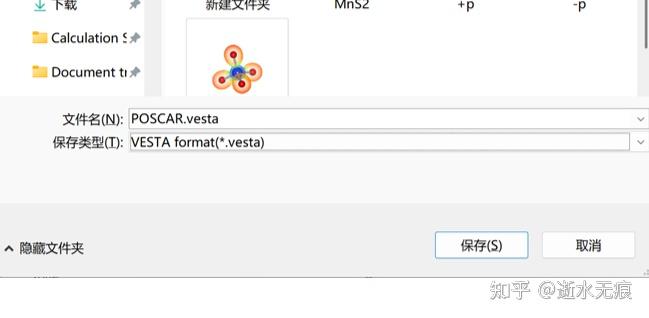
图 2 把结构文件保存为*.vesta文件
2. 打开“ascii2VESTA.m”的MATLAB文件,并运行。按照弹出的对话框分别选择anime.ascii文件和*.vesta文件。
3. 运行程序后,会生成3n个VESTAphonon-**.vesta文件(n为原胞内原子数),并用VESTA软件打开即可,如下图所示。其中**表示的第多少个声子谱。
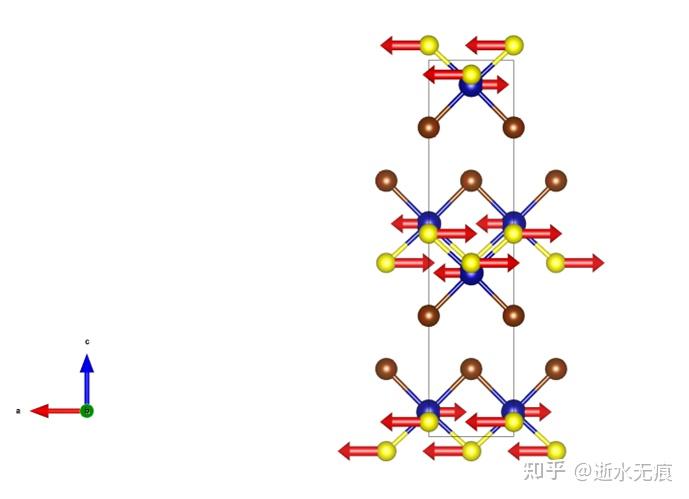
图 3 生成的VESTA文件
https://blog.sciencenet.cn/blog-1502061-1509448.html
上一篇:镜子博物馆:不简单的镜子组合
下一篇:TensorSymmetry:获取对称性约束张量,解耦自旋轨道耦合效应并建立与磁序的解析关系的对称性分析软件包